Attribute-Based Access Control (ABAC)
Attribute-Based Access Control (ABAC) is a dynamic and context-aware access control model that grants or denies user access to user journeys based on attributes associated with users and their context.
Unlike traditional access control models like Role-Based Access Control (RBAC), which rely on predefined roles, ABAC evaluates policies at runtime using user profile attributes and authentication context to make fine-grained access decisions.
In ReachFive, ABAC allows you to control who can enter a user journey (signup, login, or access to an application) and what rights are granted once access is allowed through our Entitlements feature.
ABAC is evaluated during authentication and relies primarily on user profile attributes, such as verified identifiers, custom fields, or roles defined on the user profile.
These attributes can include:
-
User profile attributes (for example, verified email, country, custom fields)
-
User roles or classifications (for example,
staff,senior_staff,admin)You can create these using Custom fields.
-
Authentication context (for example, login method or assurance level)
ABAC policies are evaluated dynamically and consistently across all user access points.
ABAC flow

At a high level per Rule Type:
-
A user attempts to access a public journey (
signuporlogin). -
ReachFive evaluates ABAC rules using user profile attributes.
-
If rules match, access is blocked.
-
If rules do not match, authentication completes.
-
Authorization attributes (Entitlements) are evaluated and added to the access token.
-
A user attempts to access a public journey (
signuporlogin). -
ReachFive evaluates ABAC rules using user profile attributes.
-
If rules match, authentication completes.
-
If rules do not match, access is blocked.
-
Authorization attributes (Entitlements) are evaluated and added to the access token.
ABAC layers in ReachFive
ABAC in ReachFive operates at two complementary layers.
Layer 1: Controlling access to user journeys
The first layer controls whether a user is allowed to enter a user journey, such as signup or login.
At this stage, ReachFive evaluates user profile attributes against access rules before completing authentication.
Examples:
-
Block login attempts using unverified identifiers.
-
Prevent access if required attributes are met or not met depending on Rule Type.
-
Restrict login based on user classification or status.
This layer expands existing security capabilities, such as Forbid unverified identifiers login, which is now managed as part of Access Control rather than Attack Protection.
Layer 2: Access token entitlements
Once a user is authenticated, ABAC can enrich the access token’s entitlements claim with personalized authorization attributes.
Entitlements are dynamic rules that evaluate a user’s profile attributes or specific conditions at runtime.
If the conditions are met, specific authorization attributes are injected directly into the access token’s entitlements claim whenever a new access token is generated.
These attributes allow applications to enforce authorization decisions downstream without needing to query the ReachFive API again.
Key behaviors of Entitlements:
-
Dynamic evaluation: Conditions are checked dynamically every time an access token is generated.
-
Refresh token checks: When an access token is refreshed, ReachFive performs a new check on the user’s profile attributes to ensure the Entitlement rule is still valid. If the user no longer meets the criteria, the attribute is omitted from the refreshed token’s
entitlementsclaim. -
Flexible values: Attribute values can be either free text (static entries) or dynamically mapped to a specific user profile attribute.
-
Non-unique attribute types: Attribute types do not need to be unique, allowing you to build arrays of entitlements (for example, assigning multiple different roles to a single user).
Examples:
-
Grant access to different portals based on user role.
-
Enable or disable features based on custom attributes.
-
Apply business-specific authorization logic.
Applications can inspect the access token’s entitlements claim to determine whether a user is allowed to proceed.
Access token payload
When Entitlement policies are successfully applied, ReachFive groups these authorization attributes within an entitlements claim array inside the access token. Applications can then evaluate these attributes, for example:
-
If
role = senior_staff, allow access -
Otherwise, block or redirect the user
This approach keeps authorization logic simple and consistent across applications.
{
  "sub": "toto",
  "entitlements": [
    {
      "type": "role",
      "value": "sales"
    },
    {
      "type": "role",
      "value": "admin",
      "nbf": 123456789,
      "exp": 123456798
    },
    {
      "type": "department",
      "value": "engineering"
    }
  ]
}
Real-world use cases
To help understand how these capabilities operate in real environments, consider the following scenarios for both layers.
Layer 1: Access rules
The first layer safeguards your brand environments by validating user context before an authentication flow finishes.
-
Corporate domain isolation for pre-launch portals: A luxury conglomerate restricts a confidential application to corporate employees of a specific jewelry subsidiary. The access rule blocks users without a verified corporate email domain, preventing unauthorized account creation or endpoint tracking from external vendors.
-
Geofencing wholesale operations: A designer brand restricts its European B2B ordering portal to requests originating within the EU to protect regional pricing strategies and distribution rights. Users attempting to authenticate from unapproved regions are stopped immediately at the edge.
Layer 2: Entitlement rules
The second layer enriches the access token’s entitlements claim array with context-aware authorization attributes whenever a token is generated or refreshed.
-
Cross-brand floating boutique staff: Retail employees frequently cover shifts across multiple brand subsidiaries. Entitlement rules evaluate their profile assignments and stack multiple store locations into the token array, allowing point of sale systems to grant access to local registers without repetitive API database lookups.
-
VIP private client drops: During a highly limited edition luxury watch release, registered customers log into the same e-commerce portal. The entitlement engine detects top-tier loyalty statuses at runtime and injects an exclusive access attribute into the token, allowing the web application to instantly render the purchase interface.
-
Automated perk revocation via token refresh: Corporate employees receive staff discounts up to an annual spending cap. The exact moment an employee exceeds this limit, the background token refresh flow re-evaluates the profile metric and strips the discount attribute from the newly issued token silently.
Create access rules in the ReachFive Console
Attributes used by ABAC are defined and managed directly from the ReachFive Console. Once defined, these attributes can be referenced in Layer 1 access rules.

You create rule groups where multiple attributes are evaluated together to determine if a user can authenticate or not.
-
The attributes within a group use
ANDlogic, meaning all attributes must match for the user to match the group criteria. -
The attributes between groups use
ORlogic, meaning if a user matches any group, they will be denied access.
When creating a group, the console dynamically updates how many of your users match the currently selected criteria.
To create a new rule in the ReachFive Console:
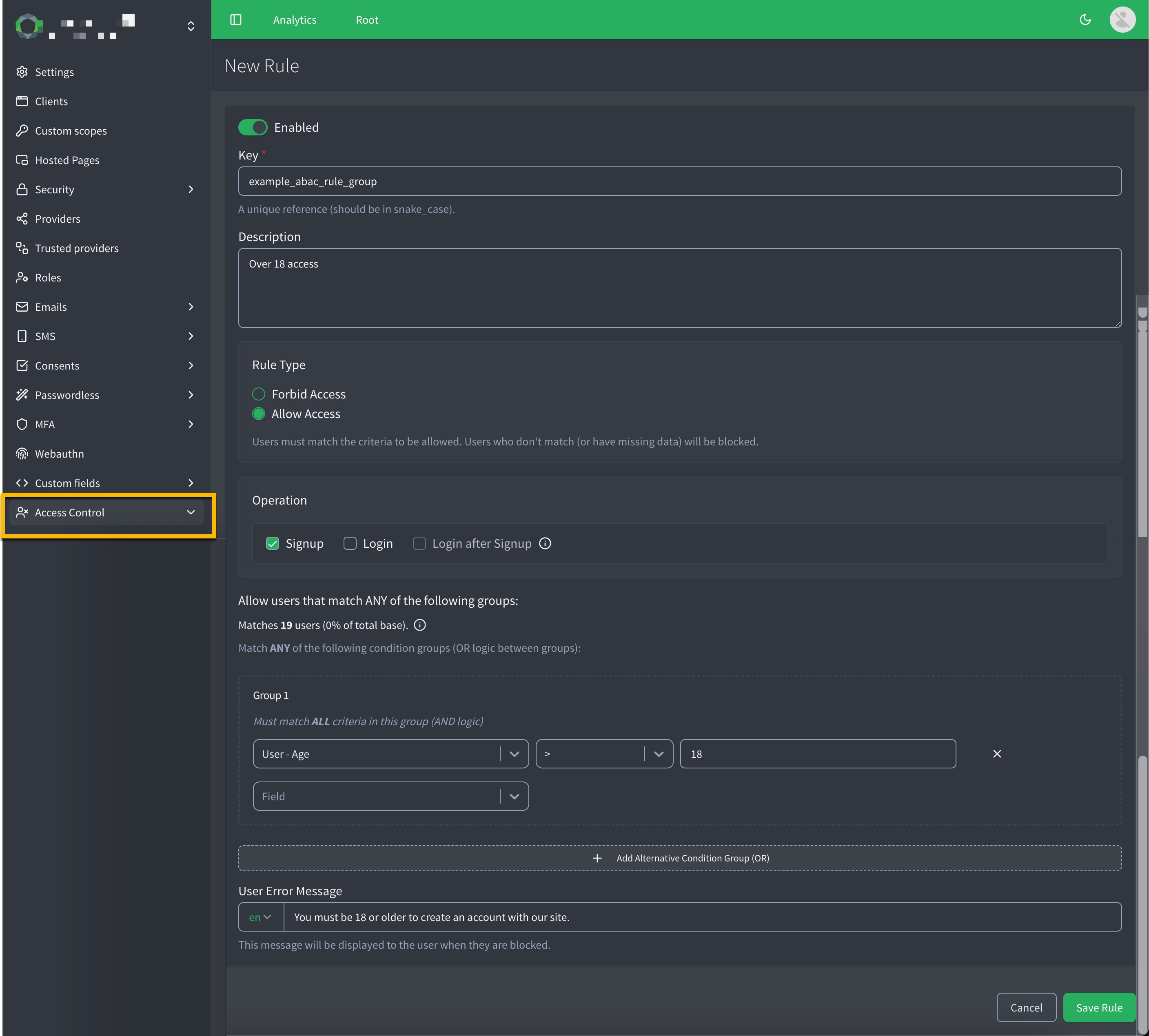
-
Go to .
-
Click New Rule.
-
Enable the feature by toggling to Enabled .
-
Specify a unique Key for the access rule (
snake_case). -
Write a Description for the rule.
-
In the Configure access restriction section:
-
Select the Rule Type.
-
Forbid Access
-
Allow Access
-
-
Select your desired Operations for one or more of the following:
-
Signup
-
Login
-
Login after Signup
This operation does not return an API error. It just prevents the generation of tokens (
tkn,access_token) in the response.
-
-
Define a User Error Message to display when access is denied.
This is a user friendly message that explains why access was blocked and what the user can do to resolve it (if applicable).
-
-
In the …for users that match the following criteria section
-
Define the attributes and values to evaluate for this rule group.
Repeat this for additional groups.
-
Create Entitlement rules
You can configure multiple Entitlement rules to define exactly which authorization attributes are injected into the access token when specific conditions are met. Each rule sets the criteria for one attribute at a time.
Similar to access rules, you build condition blocks to determine if the attribute should be provided:
-
The conditions within a block use
ANDlogic, meaning all conditions must match for the rule to apply. -
The conditions between blocks use
ORlogic, meaning if a user matches any block, the attribute will be added to the token’s entitlements claim.
To configure an Entitlement rule in the ReachFive Console:
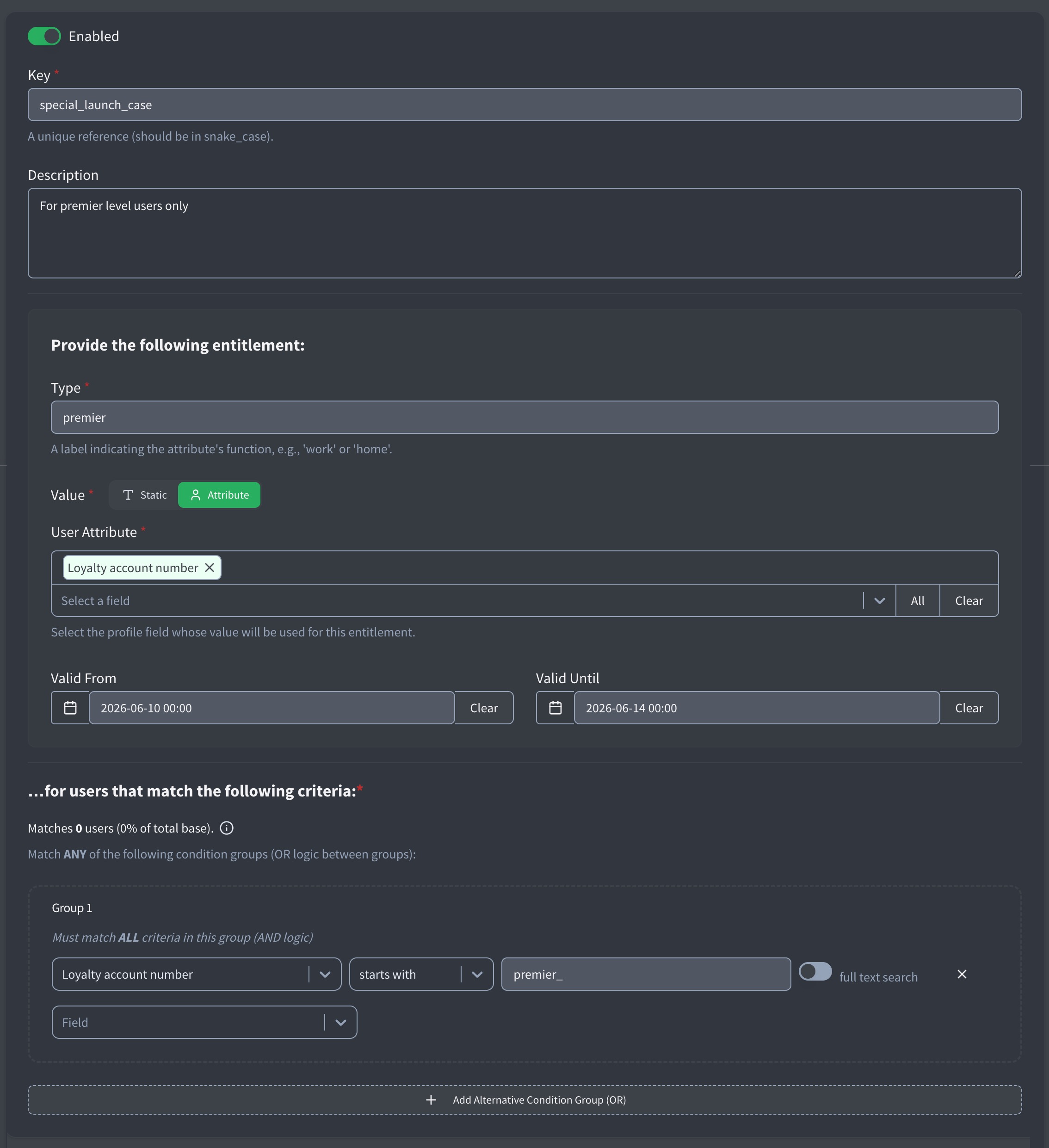
-
Go to .
-
Click New Rule.
-
Enable the feature by toggling to Enabled .
-
Specify a unique Key for the Entitlement (
snake_case). -
Write a Description for the rule.
-
In the Provide the following entitlement section:
-
Specify the attribute Type.
Attribute types do not have to be unique. This allows you to configure multiple rules that append different values to the same array (for example, assigning multiple different roles). -
Enter an attribute value. You can choose either:
-
Specify a Valid From and Valid Until time range for the attribute (optional).
-
-
In the …for users that match the following criteria section:
-
Define the user fields and conditions that must be met for this attribute to be provided. You can build conditions using standard fields, custom fields, addresses, and consent selections, utilizing all supported condition operators.
Repeat this for additional blocks.
-
Monitoring and user events
To help you monitor and debug Entitlement configurations, we trigger a dedicated entitlements_provided user event.
Whenever a new access token is generated and authorization attributes are successfully injected into it, the system fires this user event.
The payload of the entitlement_provided event includes an "entitlements" array.
This array lists the exact attribute types that were successfully evaluated and added to the token, providing a clear and independent audit trail of what access was granted.
Here is an example of an entitlements_provided user event payload:
{
  "date": "2026-05-22T09:54:34.183123Z",
  "auth_type": "password",
  "id": "ZWUTz..AAIMN",
  "type": "entitlements_provided", (1)
  "canal": "identity_first_party",
  "user_id": "350f8303-g21b-21d0-b723-226355410020",
  "profile_id": "121146661725694",
  "client_id": "sg48CdAYohRPeRWZ9j1H",
  "provider": "password",
  "device": "desktop",
  "origin": "www.example.fr/login",
  "ip": "127.0.0.1",
  "host": "https://example.io",
  "identifier_type": "email",
  "risk_score": 30,
  "scope": [
    "openid",
    "profile",
    "email"
  ],
  "entitlements": [ (2)
    "custom_info",
    "role",
    "user_type"
  ]
}| 1 | The entitlements_provided type is emitted when new access token is generated and authorization attributes are successfully injected into it. |
| 2 | In this instance, the custom_info, role, and user_type attributes were successfully evaluated and provided in the token. |
For more details on the schema, see User events: entitlements_provided.
Migrate to Access Control
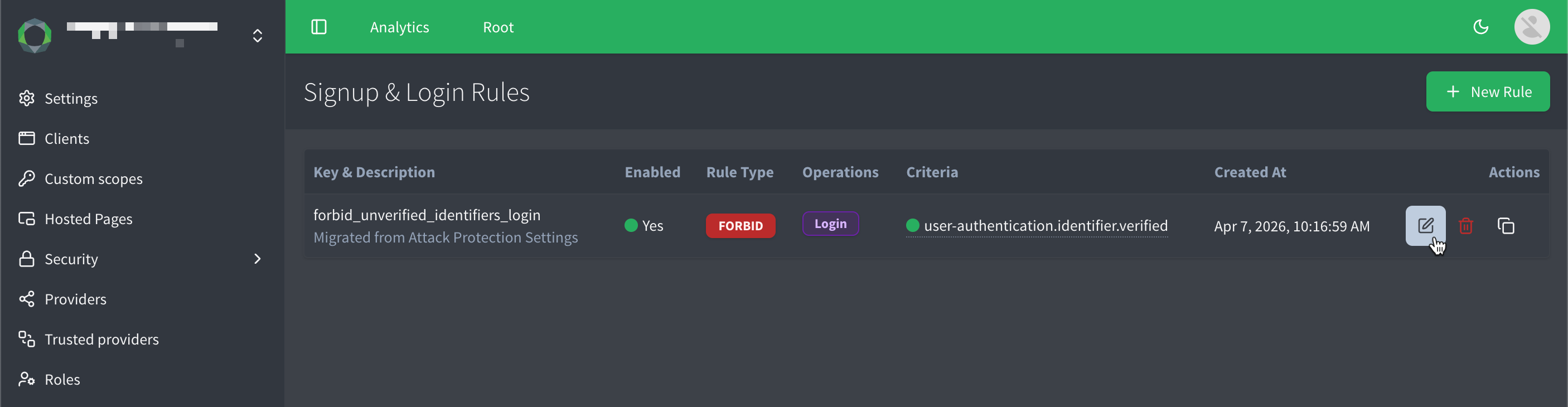
If you were previously using the the legacy Block unverified login attempts feature, you’ll see the option in the Attribute-Based Access Control (ABAC) section of the ReachFive Console to automatically migrate your existing block on unverified logins configuration to an equivalent access rule.
Migration process:
-
Click Switch to Access Control in the ABAC section of the ReachFive Console if prompted.
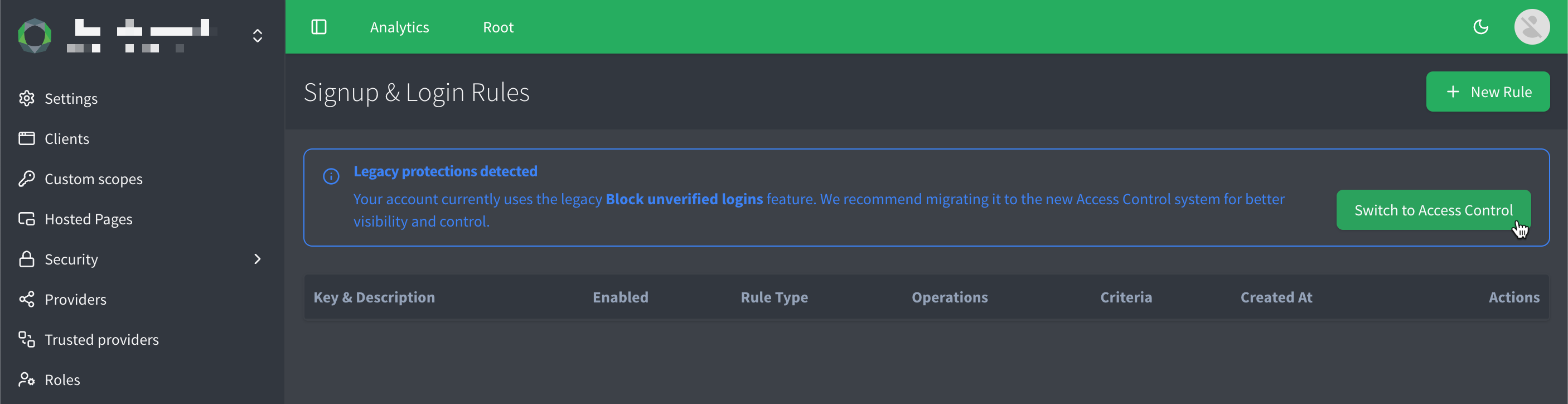
-
A dialog appears letting you know that your existing block on unverified logins configuration will be converted into an access rule. It also informs you of API error format changes that are required if you were previously relying on the old error response for unverified logins.
The error changes from
error.unverifiedLogintoerror.accessControl.login.forbidden.Click Proceed to migrate to Access Control.
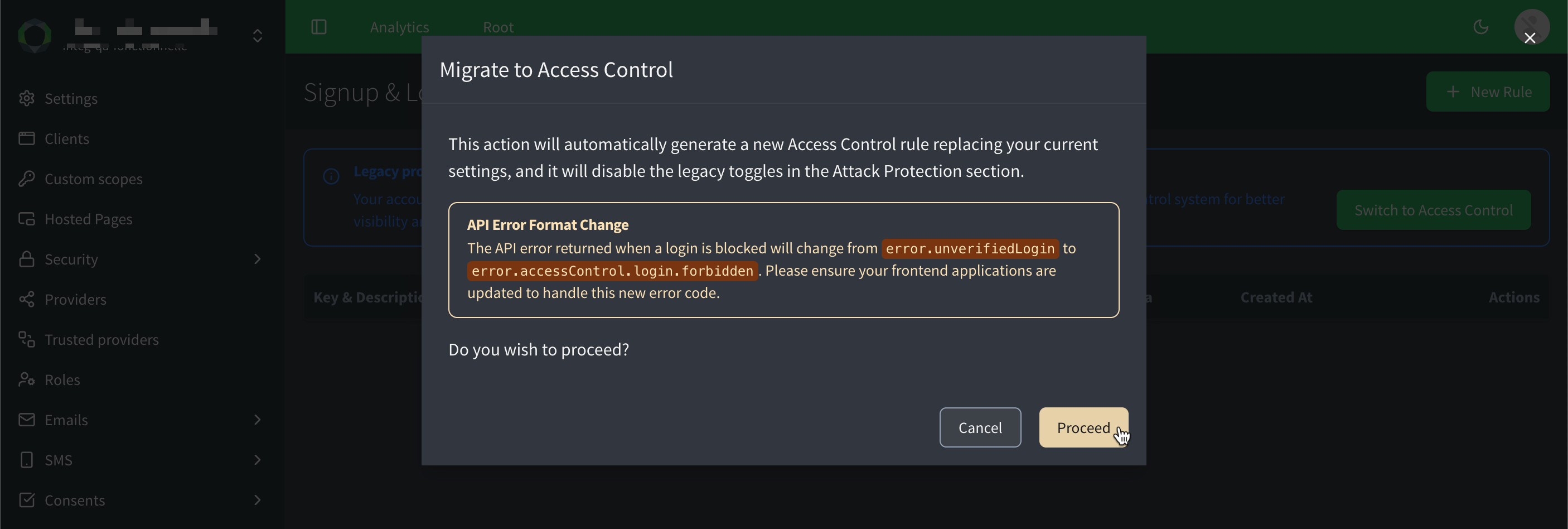
-
And voila! Your existing configuration is now an access rule, and you can further customize it as needed.
Downgrade to legacy block on unverified logins
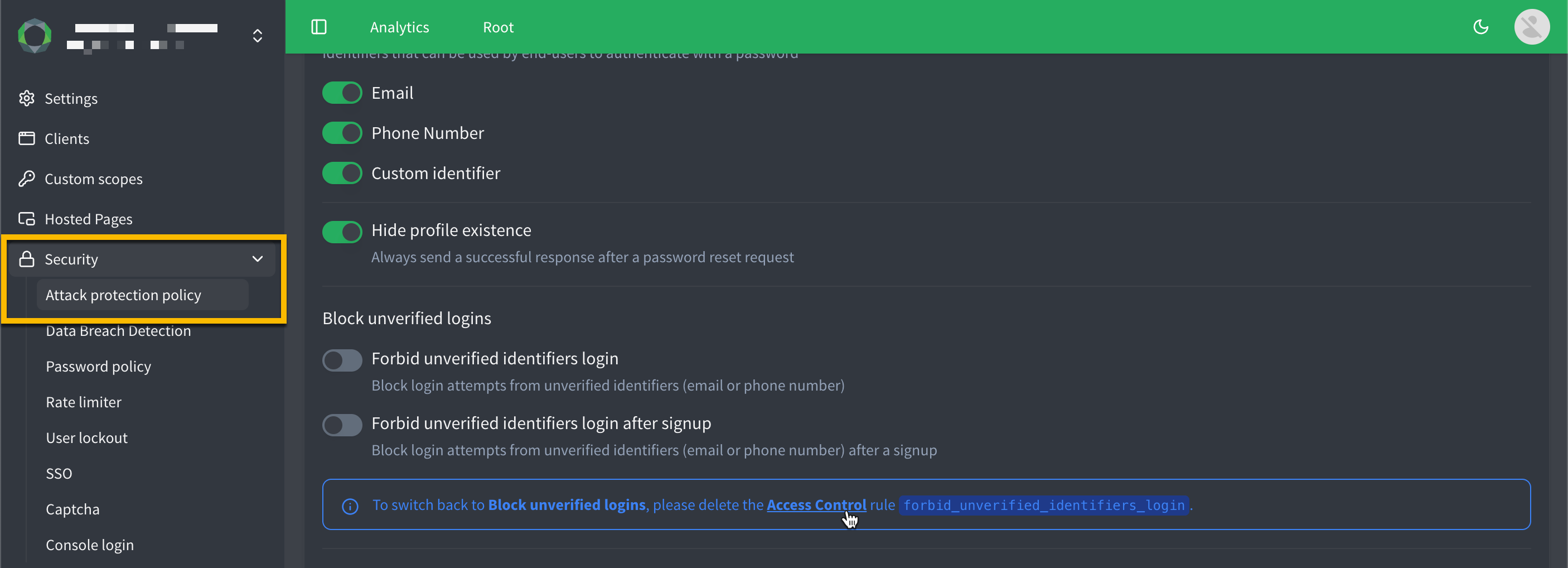
If you find that Access Control does not meet your needs, you can choose to downgrade back to the legacy block on unverified logins feature.
To downgrade back to the legacy block on unverified logins, you must first delete any access rules that were created during the migration process, as well as any additional access rules you may have created after migration.
Once all access rules have been deleted, the option to downgrade will become available in the ReachFive Console.
Best practices
-
Keep rules simple and explicit: Whether you are blocking logins or injecting authorization attributes, overly complex condition blocks can be difficult to maintain and troubleshoot.
-
Prefer verified attributes for access decisions: Always rely on verified identifiers or system-assigned statuses rather than self-asserted data when restricting access or granting high-level Entitlements.
-
Use Entitlements for downstream authorization: Offload application-level authorization to the access token. By injecting roles or custom attributes via Entitlements, downstream applications do not need to constantly query the ReachFive API.
-
Prevent token bloat: Keep your access tokens lean. Only configure Entitlements for attributes that are actively required by your applications to minimize token payload size.
-
Plan your attribute naming conventions: Because Entitlement attribute types do not need to be unique, you can stack multiple rules into the same array (like assigning multiple role values). Document these overlapping rules clearly so your development team knows what arrays to expect in the token.
-
Test rules across multiple user scenarios: Before deploying to production, verify both layer 1 (access blocks) and layer 2 (token Entitlements) using diverse test profiles. Check your user event logs to confirm the correct
entitlementsarrays are generated.